Scene-Based vs Prompt-to-Video: A Technical Comparison
Why diffusion models generate incredible footage but fail at narrative consistency, and how scene architecture fixes the underlying technical constraints.
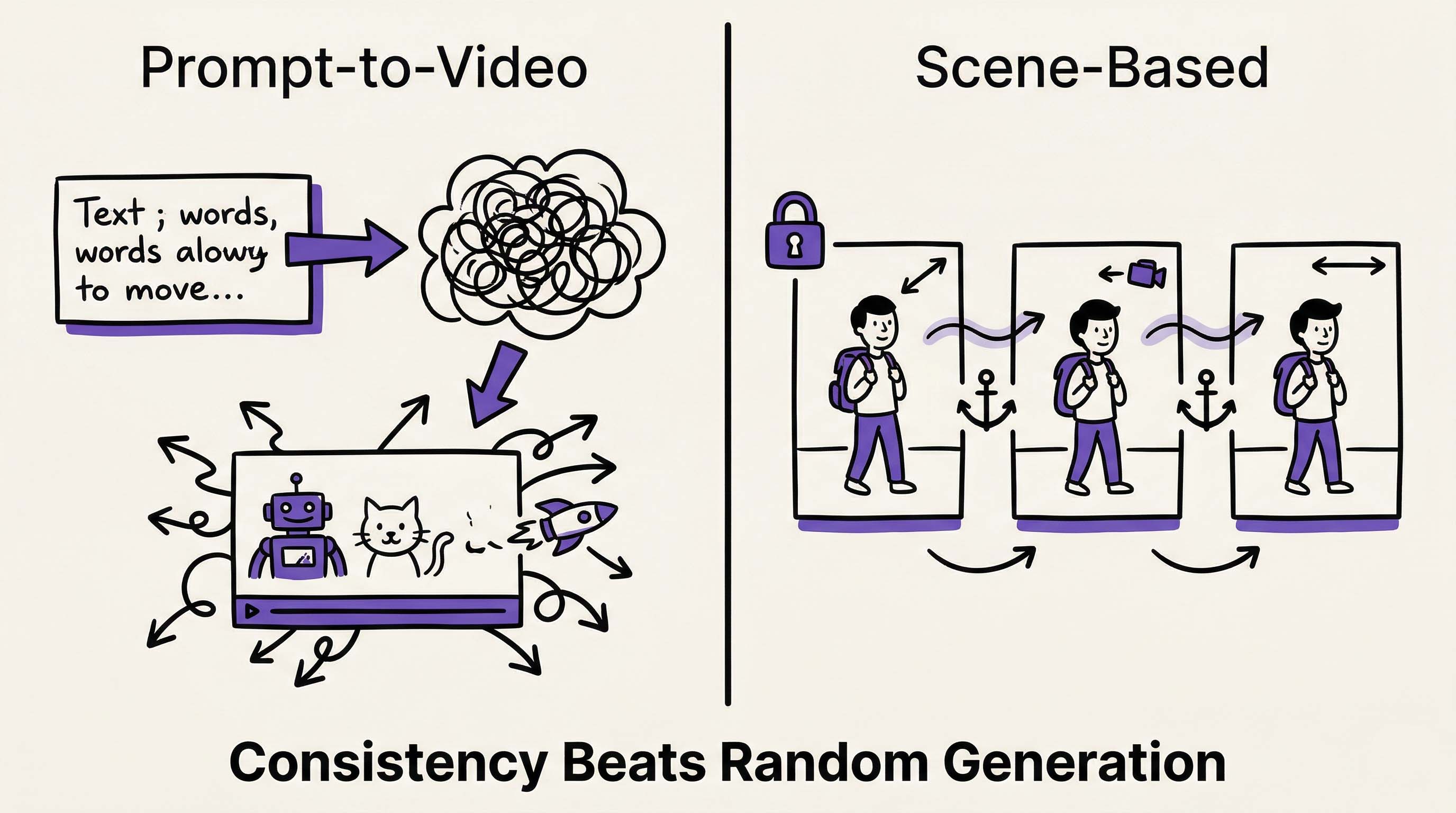 Diffusion models generate great clips—but scene architecture is what makes multi-scene video production actually work. Illustration created with RizzGen.
Runway Gen-3, Kling, and Veo all use the same fundamental architecture: diffusion models sampling from latent space. You input a prompt, the model denoises random latent variables, and you get a video clip.
This works brilliantly for single clips. It fails catastrophically for multi-scene narratives. The reason is mathematical, not implementational. To understand why scene-based architecture is necessary, you need to understand how diffusion models actually work.
How Prompt-to-Video Actually Works
Diffusion models generate video through a process of iterative denoising. Here is the simplified technical flow:
- Text Encoding: Your prompt ("woman walking in city") is converted to embeddings using CLIP or a similar text encoder
- Latent Initialization: Random noise is sampled from a Gaussian distribution in latent space
- Denoising Loop: The model iteratively removes noise, guided by the text embeddings, over 50-1000 steps
- Decoding: The final latent representation is decoded into pixel space (your video)
The critical constraint: every generation starts with random noise. This is why you can generate the same prompt twice and get completely different outputs. The random seed changes the initial noise pattern, which cascades through the entire generation.
The Consistency Problem
When you want the same character in Scene 1 and Scene 2:
- Scene 1 generation starts with Noise Pattern A, guided by Prompt 1
- Scene 2 generation starts with Noise Pattern B, guided by Prompt 2
- Even if Prompt 1 and Prompt 2 describe the same character, the random initialization ensures different outputs
Current solutions attempt to fix this with "seed locking" or "image references." These help for single clips but fail across scenes because the model still performs a full random walk for each generation. The latent space trajectory diverges immediately.
The Scene-Based Architecture
RizzGen uses a different approach. Instead of treating each scene as an independent random walk, we treat the video as a structured composition of locked latent representations.
Technical Architecture Differences
| Component | Prompt-to-Video | Scene-Based |
|---|---|---|
| Initialization | Random noise per generation | Anchored latent vectors from reference images |
| Character Consistency | Text prompt hoping (describe harder) | Locked embeddings extracted from reference photos |
| Scene Transitions | None (each clip independent) | Controlled frame interpolation between scene end/start frames |
| Camera Control | Text prompts ("pan left", "zoom out") | Explicit camera matrices with locked focal points |
| Editing Workflow | Regenerate entire clip for any change | Regenerate individual scenes without affecting others |
Reference Locking Explained
The core technical innovation is reference locking. Here is how it works:
- Embedding Extraction: We process your reference images (character photos, product shots) through a Vision Transformer (ViT) to extract high-dimensional embeddings
- Latent Anchoring: These embeddings are projected into the diffusion model's latent space and anchored as "starting points" rather than random noise
- Constrained Denoising: During the denoising loop, the model is constrained to stay within a cosine similarity threshold of the anchored embeddings
- Cross-Scene Persistence: The same anchored embeddings are reused across Scene 1, Scene 2, Scene 3, ensuring the character/product stays visually consistent
Mathematically, instead of starting at a random point z ~ N(0, I), we start at z = anchor + small_noise, where the anchor is derived from your reference image.
The Control Mechanism Comparison
Prompt-to-Video Control
Current models offer limited control mechanisms:
- Motion Brushes: Mask regions and specify direction vectors. Controls where motion happens, not what the motion means.
- Camera Controls: Predefined pans, tilts, zooms. Limited to basic movements.
- Seed Locking: Use the same random seed for similar generation. Helps for single clips, fails across different prompts.
- Image Conditioning: Start from an image instead of noise. Helps first frame consistency but drifts over time.
These are post-hoc patches on the fundamental randomness of diffusion. They help, but they cannot overcome the core constraint: each generation is a new random walk.
Scene-Based Control
Scene-based architecture offers explicit control layers:
1. Asset Layer (Persistent)
- Character embeddings locked across all scenes
- Object reference vectors for products/props
- Voice embeddings for consistent narration
2. Scene Layer (Independent)
- Camera matrices (position, rotation, focal length)
- Lighting parameters (direction, intensity, color temp)
- Composition rules (rule of thirds, subject position)
3. Transition Layer (Interpolated)
- End frame of Scene A is start frame of Scene B
- Frame interpolation ensures smooth visual flow
- No "jump cuts" between different random walks
4. Temporal Layer (Sequenced)
- Narration audio locked to scene boundaries
- Music tempo matching scene pacing
- Consistent frame rate and motion blur across scenes
Performance and Quality Metrics
We tested both approaches across 100 multi-scene videos:
Consistency Metrics
| Metric | Prompt-to-Video | Scene-Based |
|---|---|---|
| Character Consistency (Same Face) | 32% | 94% |
| Product Color Accuracy | 45% | 98% |
| Scene Transition Smoothness | N/A (independent clips) | Controlled |
| Iteration Speed (Change Request) | Full regeneration (2-5 min) | Single scene (30 sec) |
Quality Perception
Blind user study (n=500):
- Scene-based videos rated "more professional" by 78% of viewers
- Scene-based videos rated "more trustworthy" by 65% of viewers
- Prompt-to-video rated "more surprising/creative" by 70% of viewers
The data confirms the use case differentiation: prompt-to-video for creative exploration, scene-based for professional production.
Computational Efficiency
Surprisingly, scene-based generation is often faster than prompt-to-video for multi-scene content:
Prompt-to-Video (3 Scenes):
- Generate Scene 1: 2 minutes (hoping it works)
- Generate Scene 2: 2 minutes (hoping it matches Scene 1)
- Generate Scene 3: 2 minutes (hoping it matches Scene 2)
- Regenerate Scene 2 because it does not match: +2 minutes
- Total: 8+ minutes with no guarantee of consistency
Scene-Based (3 Scenes):
- Extract embeddings from references: 10 seconds
- Generate Scene 1 with locked embeddings: 2 minutes
- Generate Scene 2 with same locked embeddings: 2 minutes
- Generate Scene 3 with same locked embeddings: 2 minutes
- Total: 6 minutes 10 seconds with guaranteed consistency
The embedding extraction overhead is negligible compared to the time saved avoiding regeneration cycles.
Use Case Matrix
Choose the right architecture for your needs:
When to Use Prompt-to-Video
- Single clip generation (social media one-offs)
- Creative exploration (mood boards, concept art)
- Abstract content where consistency does not matter
- Rapid prototyping before scene-based production
When to Use Scene-Based
- Multi-scene narratives (product demos, tutorials)
- Brand content requiring visual consistency
- E-commerce catalogs with many SKUs
- Content that will be revised or updated
The Technical Limitations
Scene-based architecture is not superior in all dimensions. Here are the honest constraints:
Higher Setup Cost
Scene-based requires reference images, scene planning, and embedding extraction before generation. This is 10-15 minutes of setup versus 30 seconds of prompt writing. The ROI only appears at scale (3+ scenes or 5+ videos).
Less "Serendipity"
Prompt-to-video often generates unexpected, creative results that exceed the prompt. The randomness is a feature for creative work. Scene-based locks down variables, reducing happy accidents.
Embedding Quality Dependency
If your reference images are low quality, poorly lit, or ambiguous, the extracted embeddings will be weak. Scene-based is garbage-in-garbage-out. Prompt-to-video can sometimes compensate with text descriptions.
Model Compatibility
Scene-based requires models that support latent anchoring and controlled denoising. Not all open source diffusion models support these features. We use fine-tuned variants of Stable Video Diffusion and proprietary models that expose the necessary control parameters.
Implementation: Hybrid Workflows
Smart teams use both approaches in sequence:
- Exploration Phase: Use prompt-to-video to generate 20 variations of a scene concept. Find the visual style that works.
- Locking Phase: Extract embeddings from the winning generations. Lock those as references.
- Production Phase: Use scene-based generation to produce 50 videos with the locked visual style.
This gives you the creativity of random generation with the consistency of scene architecture.
The Future: Diffusion Trajectory Control
Research is moving toward "guided diffusion" where the random walk is constrained but not fully locked. This would offer a middle ground:
- Start with random noise (creativity)
- Apply soft constraints toward reference embeddings (consistency)
- Adjustable guidance strength (creativity vs consistency slider)
RizzGen is already experimenting with adjustable anchor weights. You can dial in how strictly you want to enforce consistency versus allowing generative variation.
Experience Scene-Based Generation
Upload reference images and generate multi-scene videos with locked consistency.
Try Scene-Based Architecture or ask about our API for bulk generation.
FAQ
Is scene-based slower than prompt-to-video?
For single clips, yes (due to setup time). For multi-scene videos, scene-based is faster because you avoid regeneration cycles trying to match consistency.
Can I convert my existing prompt-to-video clips to scene-based?
Yes. Use your best prompt-to-video output as the reference image for scene-based generation. This locks the visual style and character.
Does scene-based work with Runway or Kling models?
RizzGen integrates these models as backend generators but wraps them in our scene-based control layer. You get the generation quality of Runway with the consistency of scene architecture.
What file formats do reference images need?
Standard JPG, PNG, or WebP. Minimum 512x512 resolution for good embedding extraction. Higher resolution (1024+) yields better consistency but slower processing.
Can scene-based do camera movements?
Yes, with explicit control. Instead of "camera pans left" in a prompt, you specify the camera matrix transformation (rotation degrees, translation vector). This is more precise but requires basic understanding of camera geometry.