Product Video Storyboarding with AI: From One Image to Cinematic Scenes
Upload one product photo. Generate multi-scene storyboards automatically. No prompt engineering. No consistency issues. Just cinematic product videos.
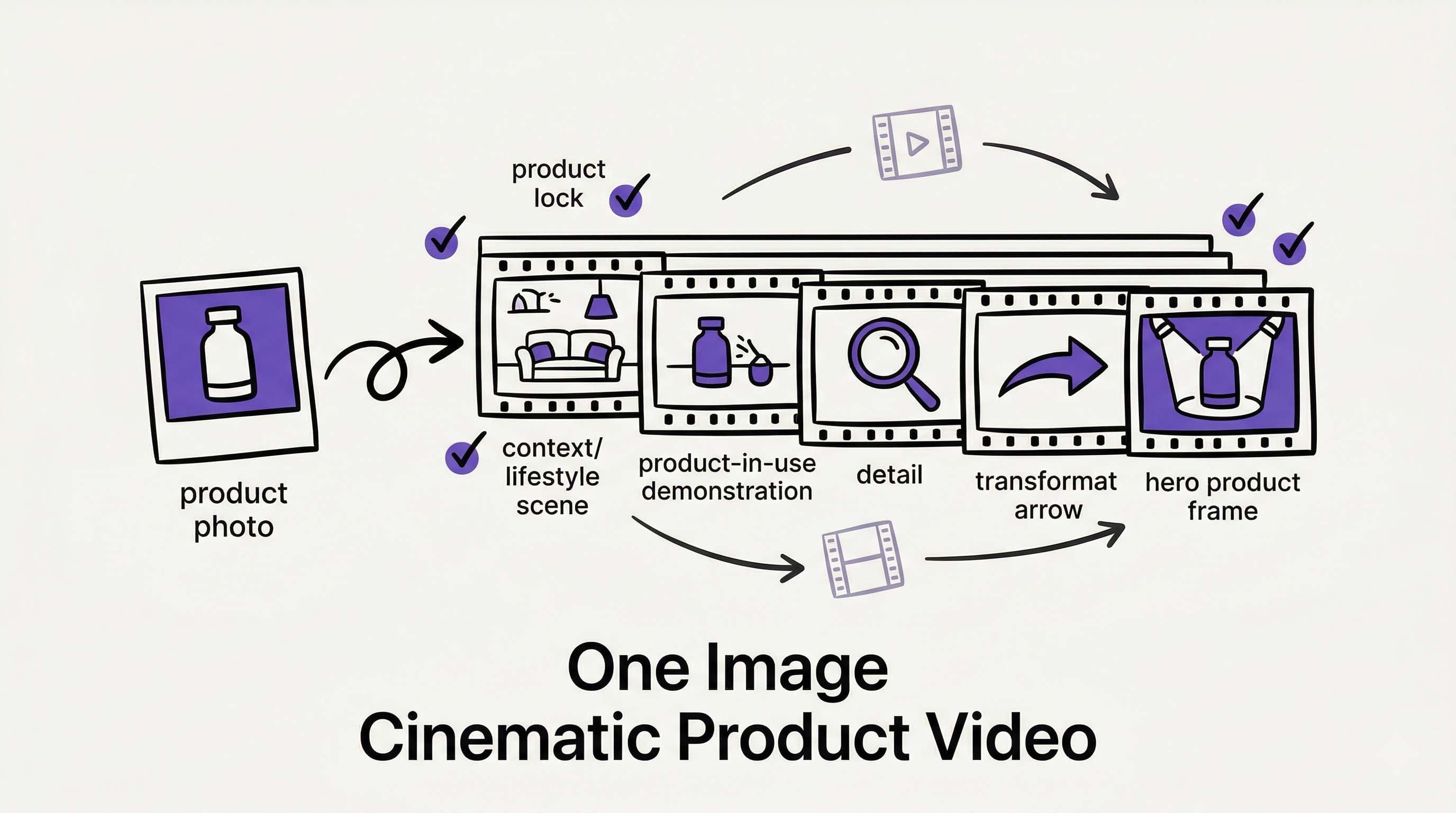 Upload one product image and AI builds a full cinematic storyboard around it. Illustration created with RizzGen.
You have a product photo. You need a video. Not a slideshow. Not a screen recording. A cinematic video that shows your product in context, in motion, in a story.
Traditionally, this meant hiring a videographer, booking a studio, styling a set, and hoping the product looks the same in every shot. Or it meant wrestling with AI tools, writing prompts, and watching your product morph into something unrecognizable between scenes.
RizzGen Cinematic Mode changes this. Upload one image of your product. Our AI builds a multi-scene storyboard around it. The product stays locked. The scenes stay consistent. You get a cinematic video without touching a camera or writing a prompt.
The Old Way vs. The RizzGen Way
Traditional Production
- Book studio and videographer ($500-2000/day)
- Ship product to location, style the set
- Shoot for 4 hours, capture 20 usable seconds
- Edit for 2 days, color grade, export
- Product looks different in different lighting
- Total time: 1 week. Total cost: $2000+
Standard AI Tools
- Upload product image
- Write detailed prompt: "Product on marble counter, morning light, shallow depth of field..."
- Generate Scene 1: Looks good
- Generate Scene 2: Product is a different color
- Generate Scene 3: Product has extra buttons that do not exist
- Spend 3 hours prompt engineering for consistency that never comes
RizzGen Cinematic Mode
- Upload one product image
- Chat with Rizzi about your video goals: "I want to show this in a modern kitchen, then in use, then the result"
- Rizzi drafts the scene structure automatically
- Generate 5 scenes. Product looks identical in each.
How Cinematic Mode Works
Cinematic Mode is built for product storytelling. It is not a text-to-video tool where you hope the AI understands. It is a product-to-video system where the AI knows exactly what it is working with.
Step 1: Upload Your Product Image
One photo. Any angle. The system extracts the product's visual fingerprint: shape, color, texture, proportions, logos, distinctive features.
This happens automatically. You do not describe the product. You do not label parts. You just upload.
Step 2: Talk to Rizzi About Your Video
Instead of writing prompts, you have a conversation. Tell Rizzi what you want:
- "Show this in a premium lifestyle setting"
- "I want to demonstrate the main feature, then show the result"
- "Make it feel like an Apple product video"
- "This is for TikTok, keep it fast and energetic"
Rizzi translates your intent into a scene structure. It suggests:
- Scene 1: Establishing shot (product in context)
- Scene 2: Feature demonstration (product in use)
- Scene 3: Result/Reveal (transformation or benefit)
- Scene 4: Detail shot (texture, craftsmanship)
- Scene 5: Closing shot (product hero with branding)
You can accept the structure, modify it, or ask for completely different angles. This is collaborative planning, not prompt guessing.
Step 3: Generate with Product Lock
Here is what makes Cinematic Mode different from standard AI video tools:
The product is locked. In every scene, the system references your original upload. The color stays true. The logo stays sharp. The proportions stay accurate. Even as lighting changes, camera moves, and backgrounds shift, your product remains visually consistent.
This is reference locking at work. Not prompt engineering. Not hoping. Guaranteed consistency because the system knows exactly what your product looks like and refuses to drift.
Step 4: Review and Refine
Watch the generated scenes. If Scene 3's lighting feels too dark, ask Rizzi to brighten it. If you want a different camera angle in Scene 2, say "more top-down." Regenerate just that scene. The product stays locked. Only the environment changes.
You are directing, not prompting. "Make this feel warmer" works better than "add golden hour lighting with 2700K color temperature and volumetric fog."
What You Get: The Scene Types
Cinematic Mode generates specific scene types based on your conversation with Rizzi:
The Establishing Shot
Product in context. A watch on a wrist. A blender on a counter. A bag on a shoulder. Establishes scale, use case, and lifestyle fit.
The Demonstration
Product in action. The watch face animating. The blender running. The bag opening to show interior. Proves functionality without explanation.
The Detail Shot
Close-up on craftsmanship. Stitching on leather. Texture of ceramic. Glow of a screen. Builds perceived quality and justifies price.
The Transformation
Before and after. Coffee beans to poured espresso. Messy desk to organized setup. Dry hair to styled. Shows the promise, not just the product.
The Hero Shot
Product alone, perfect lighting, ready for the final frame. The image you would put on a billboard. Clean, iconic, memorable.
Each scene maintains your product exactly as uploaded. Different angles, different lighting, different contexts. Same product.
No Prompt Engineering Required
The biggest friction in AI video is the prompt. Writing "cinematic, 8k, shallow depth of field, golden hour, anamorphic lens flare" and hoping the AI understands what you mean.
Cinematic Mode removes this. You do not write prompts. You:
- Upload the product
- Tell Rizzi the goal ("I want to show this watch as a luxury item for young professionals")
- Review the scene structure Rizzi proposes
- Generate
If you want changes, you describe them like you would to a human director:
- "Make the kitchen feel more modern"
- "Can we see the product from above in Scene 2?"
- "The lighting feels too dark, brighten it"
- "Add more energy to the camera movement"
Rizzi translates these into technical adjustments. You stay in creative control without learning prompt syntax.
Use Cases: Who Is This For?
E-commerce Brands
Generate product videos for 100 SKUs from catalog photos. Each video shows the product in use, in context, in motion. No studio. No shipping products to videographers. Upload the same product photo you use for your listing, get a video back.
Crowdfunding Campaigns
Create the demo video for your Kickstarter from your prototype photo. Show the product in idealized scenarios before manufacturing is complete. Test different visual approaches without reshooting.
App and Software Products
Turn UI screenshots into cinematic device mockups. The app interface stays locked (reference from your screenshot). The device moves, the background changes, the lighting shifts. Professional product videos without After Effects.
Real Estate and Properties
Generate walkthrough videos from property photos. The room layout stays consistent. Lighting changes from morning to evening. Camera moves through the space. Virtual staging without virtual staging software.
Food and Beverage
Create recipe videos and serving suggestions from product photos. The dish stays consistent. The preparation happens around it. The steam rises the same way in every scene.
The Rizzi Advantage
Rizzi is not a chatbot that suggests prompts. It is a creative director that builds scene structures.
When you say "I want to show this backpack for urban commuters," Rizzi does not respond with "try prompt: backpack on subway, cinematic lighting..."
Rizzi responds with a scene breakdown:
- Scene 1: Backpack on person walking through city (establishing commuter use)
- Scene 2: Opening compartments to show laptop sleeve (feature demonstration)
- Scene 3: Close-up on water-resistant material (quality detail)
- Scene 4: Person grabbing backpack and leaving coffee shop (lifestyle energy)
You can approve this, modify it, or ask for something completely different. Rizzi iterates like a creative partner, not a prompt generator.
Access Rizzi at https://app.rizzgen.ai/chat to plan your video before generating.
Technical Specifications
What you get from Cinematic Mode:
- Output: 1080p HD video, 24-30fps
- Duration: 5-15 seconds per scene (typical)
- Scenes per project: Unlimited (generate 5, 10, 50 scenes from one upload)
- Aspect ratios: 16:9 (landscape), 9:16 (vertical), 1:1 (square), 4:5 (social)
- Audio: Optional voiceover per scene, background music, or silent
- Export: MP4, ready for any platform
Best Practices
Upload Quality
Use the highest resolution product photo you have. The system extracts detail from your upload. Better input means better output.
Product Visibility
Make sure your product is clearly visible in the upload. If you upload a photo where the product is half-hidden by packaging, the system has less to work with.
Conversation with Rizzi
Be specific about your audience and goal. "Luxury watch for executives" produces different scenes than "Affordable watch for students." The product stays the same. The story changes.
Scene Review
Generate a test scene first. Check that your product looks accurate. Once confirmed, generate the full sequence. The product lock ensures consistency across all subsequent scenes.
Limitations (Honest)
Cinematic Mode excels at product-centric videos. It is not designed for:
- Videos without a clear product focus (abstract brand films)
- Complex narrative storytelling with multiple characters
- Videos requiring specific human talent or locations
- Real-time or live-action capture
For those, traditional production still wins. For product demonstration at scale, Cinematic Mode replaces the studio.
Create Your First Cinematic Product Video
Upload one product photo. Chat with Rizzi about your vision. Generate multi-scene videos with perfect product consistency.
Try Cinematic Mode or chat with Rizzi to plan your video.
FAQ
Do I need to write prompts to generate start frame or video?
No. Rizzi handles everything, just upload product image once, no prompting for generating start frame or video for the scene. You can pass additional instruction but totally optional.
Will my product look the same in every scene?
Yes. Your product will be visually consistent across all scenes. Color, logo, proportions stay locked. Lighting and background change. Product stays true.
What if I do not like the first generation?
Regenerate individual scenes without affecting others. The product upload stays the same, so you can iterate quickly.
Does this work for services or digital products?
Yes. Upload a screenshot of your app, a mockup of your service, or any visual representation. The system treats it the same way: lock the visual, generate scenes around it.